
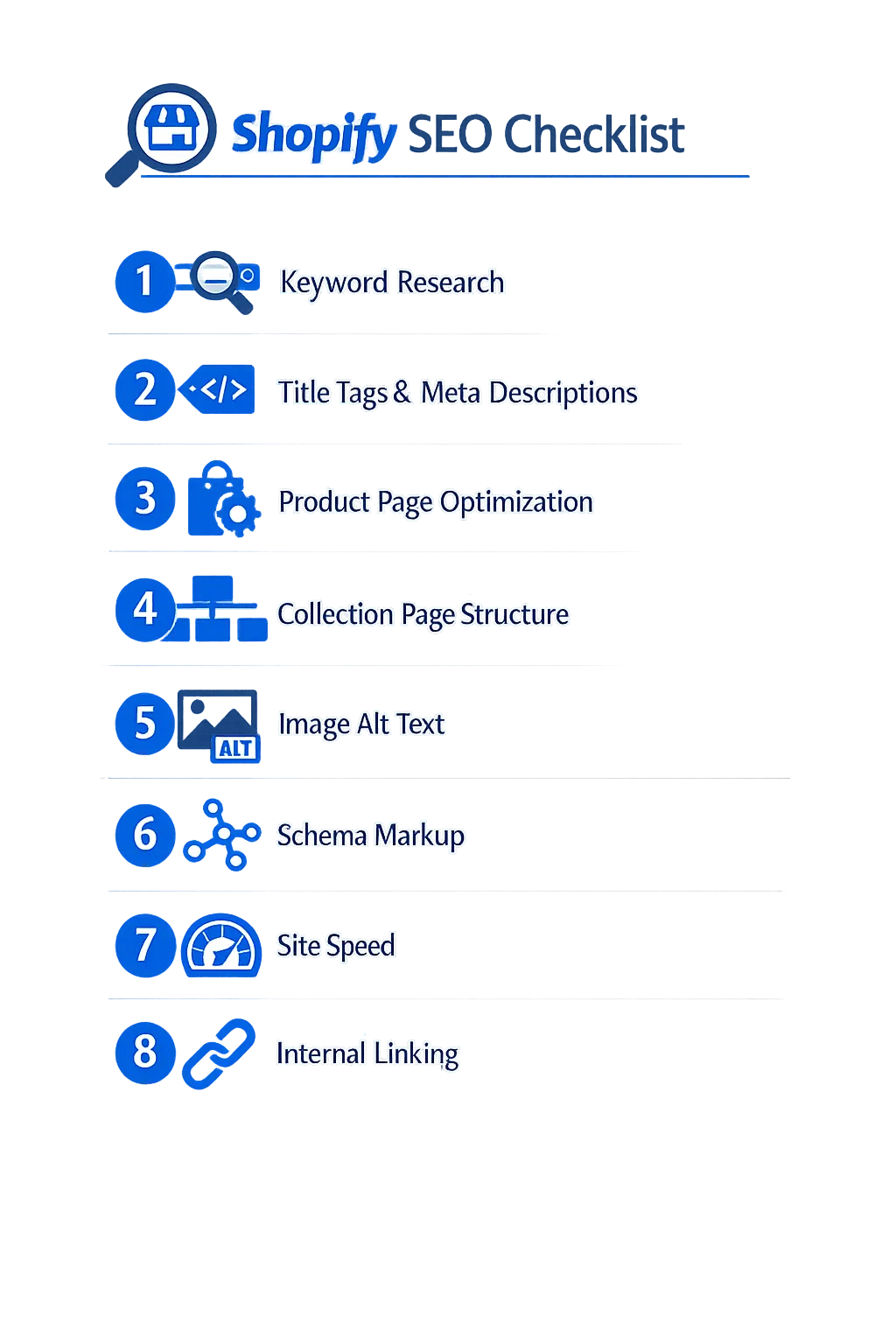
Shopify SEO in South Africa follows the same core principles as any ecommerce platform—but the platform has specific quirks that trip up store owners. Forced URL prefixes, duplicate content from product variants, and limited control over structured data all require workarounds. We audited 40+ Shopify stores across Durban, Johannesburg, and Cape Town in Q1 2026. The stores ranking on page one shared the same eight optimisation patterns. This guide breaks them down.
South Africa's ecommerce market hit R71 billion in 2025, with Shopify powering a growing share of local online stores. Yet most SA Shopify merchants rely entirely on the platform's default SEO settings. That means missed rankings, lost organic traffic, and an over-reliance on paid ads that eat into margins—especially painful when you're billing in Rand.
What Shopify Handles Automatically (And Where It Falls Short)
Shopify generates XML sitemaps, adds canonical tags to prevent duplicate indexing, creates a robots.txt file, and delivers mobile-responsive themes out of the box. These basics put you ahead of a poorly configured WordPress or custom-built store. But they don't get you ranked.
The platform falls short in five areas that matter for South African stores:
- URL structure is rigid. Every product lives under
/products/and every collection under/collections/. You cannot create flat URLs like/running-shoes. This adds folder depth that slightly dilutes crawl priority. - Duplicate content from variants and collections. A product appearing in three collections creates three indexable URLs by default. Shopify adds canonical tags, but Google doesn't always respect them.
- Limited schema control. The default theme adds basic
Productschema. It missesBreadcrumbList,FAQPage,Organization, andReviewmarkup that wins rich snippets. - No native blog tag pages. Blog categories create thin, paginated tag pages that dilute your crawl budget.
- App bloat kills page speed. Each installed app injects JavaScript. We've seen stores with 15+ apps loading 4MB of scripts on every page, pushing load times past 6 seconds.
Product Page Optimisation for Shopify Stores
Product pages are your money pages. Every product page needs a unique title tag, a keyword-rich meta description, structured product descriptions, and optimised images. Here's the exact process we use for SA Shopify stores.
Title Tags and Meta Descriptions
Shopify auto-generates title tags from your product name. That's almost never good enough. A product called "Blue Running Shoes" becomes Blue Running Shoes – Your Store Name—no keyword targeting, no differentiation.
Write title tags that include your primary keyword, a benefit, and your brand. Keep them under 60 characters. Example: Blue Running Shoes | Lightweight Trail Runners | BrandName.
Meta descriptions should include a price signal (in Rand for SA stores), a USP, and a call to action. Keep them between 150-160 characters. Google shows these in search results, and a strong description lifts click-through rates by 15-30%.
Product Descriptions That Rank
The default Shopify product description field accepts rich text, but most store owners paste in manufacturer copy. That's duplicate content shared across every retailer selling the same product.
Write original descriptions of at least 300 words per product. Include your target keyword in the first sentence. Add specifications in a structured format—bullet points or a table. Mention the product's relevance to South African buyers: shipping times within SA, Rand pricing, compatibility with local conditions (load-shedding-proof for electronics, UV-resistant for outdoor gear).
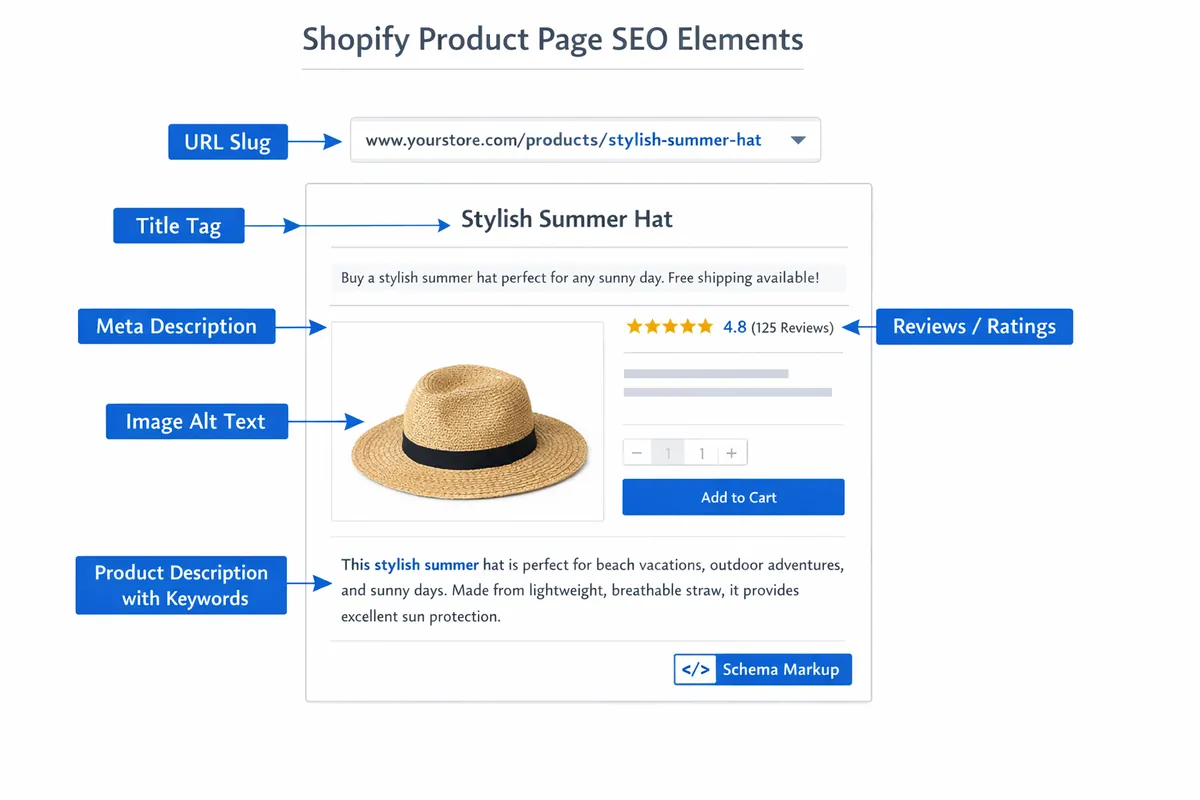
Image Optimisation
Shopify serves images through its CDN with automatic WebP conversion, which handles format optimisation for you. Your job is threefold:
- Write descriptive alt text for every product image. Not "IMG_4392" but "Navy blue leather laptop bag with gold zip detail front view." Include your keyword naturally in at least one image's alt text.
- Name files before uploading. Shopify keeps your original filename. Upload
navy-leather-laptop-bag.jpg, notDSC00421.jpg. - Compress before uploading. Shopify's CDN won't reduce a 5MB DSLR photo to a sensible size. Run images through TinyPNG or Squoosh first. Target under 200KB per product image.
Technical SEO Fixes Every Shopify Store Needs
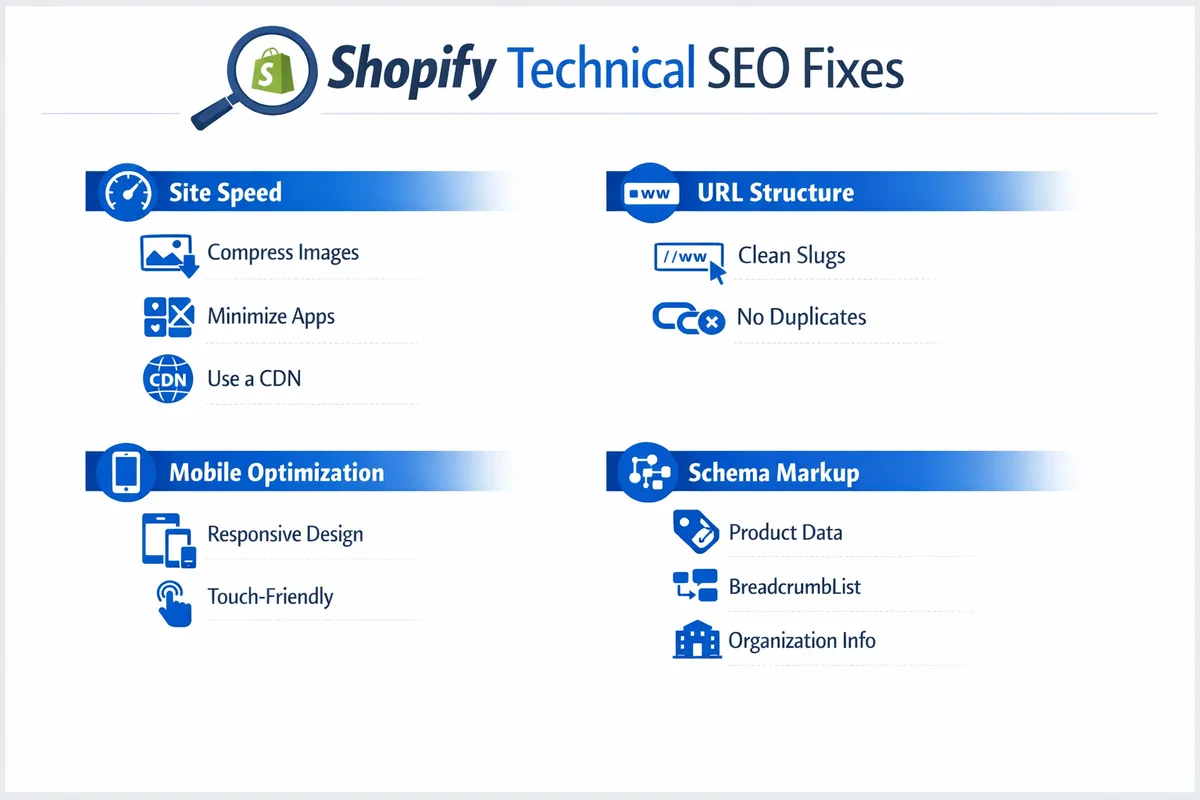
Shopify's hosted infrastructure handles server uptime, SSL certificates, and CDN delivery. But three technical issues consistently hurt SA Shopify stores in search rankings: page speed, duplicate URLs, and missing structured data.
Page Speed on Shopify
Shopify stores in South Africa face a unique speed challenge: most customers browse on mobile over 4G or LTE connections, not fibre. A store that loads in 2.5 seconds on Cape Town fibre might take 5+ seconds on a Vodacom connection in Pietermaritzburg.
The fastest wins:
- Audit your apps. Uninstall every app you're not actively using. Each one adds JavaScript that blocks rendering. We've seen a 40% speed improvement from removing 6 unused apps on a single store.
- Use system fonts as fallbacks. Custom fonts add 100-300KB of downloads. Load them with
font-display: swapso text renders immediately. - Lazy-load images below the fold. Most Shopify themes now support native lazy loading. Verify it's enabled in your theme settings. This is a Core Web Vitals factor that directly affects your Largest Contentful Paint score.
- Minimise hero image file sizes. Homepage sliders with 2MB images are the single biggest speed killer. Replace carousels with a single, compressed hero image.
Fixing Duplicate Content Issues
Shopify creates duplicate URLs when products appear in multiple collections. A product at /collections/winter-jackets/products/puffer-coat and /collections/sale/products/puffer-coat is the same page with two URLs.
Shopify adds canonical tags pointing to /products/puffer-coat, which helps. But you should also:
- Link internally to the
/products/URL only, never the collection-prefixed version - Submit only
/products/URLs in your sitemap (Shopify does this by default) - Use the
robots.txtto block collection-filtered URLs if they're creating crawl waste
Schema Markup Beyond the Defaults
Shopify themes include basic Product schema with price, availability, and rating data. That's enough for product rich snippets. But you're missing opportunities without additional structured data.
Add these schema types manually or via an app like JSON-LD for SEO:
- Organization schema on your homepage with your business name, logo, social profiles, and contact details
- BreadcrumbList schema on every page for breadcrumb rich results
- FAQPage schema on product pages with common questions—this wins People Also Ask placements
- LocalBusiness schema if you have a physical location or offer local pickup. Read our schema markup implementation guide for the full setup process.
Is Your Shopify Store Losing Rankings?
We audit Shopify stores across South Africa for technical SEO issues, content gaps, and missed ranking opportunities. Get a detailed report with prioritised fixes.
Get Your Free Shopify SEO Audit →Collection Page SEO Strategy
Collection pages are Shopify's category pages. They're often the highest-traffic entry points from Google because they match commercial search intent—someone searching "women's running shoes South Africa" lands on a collection, not a single product.
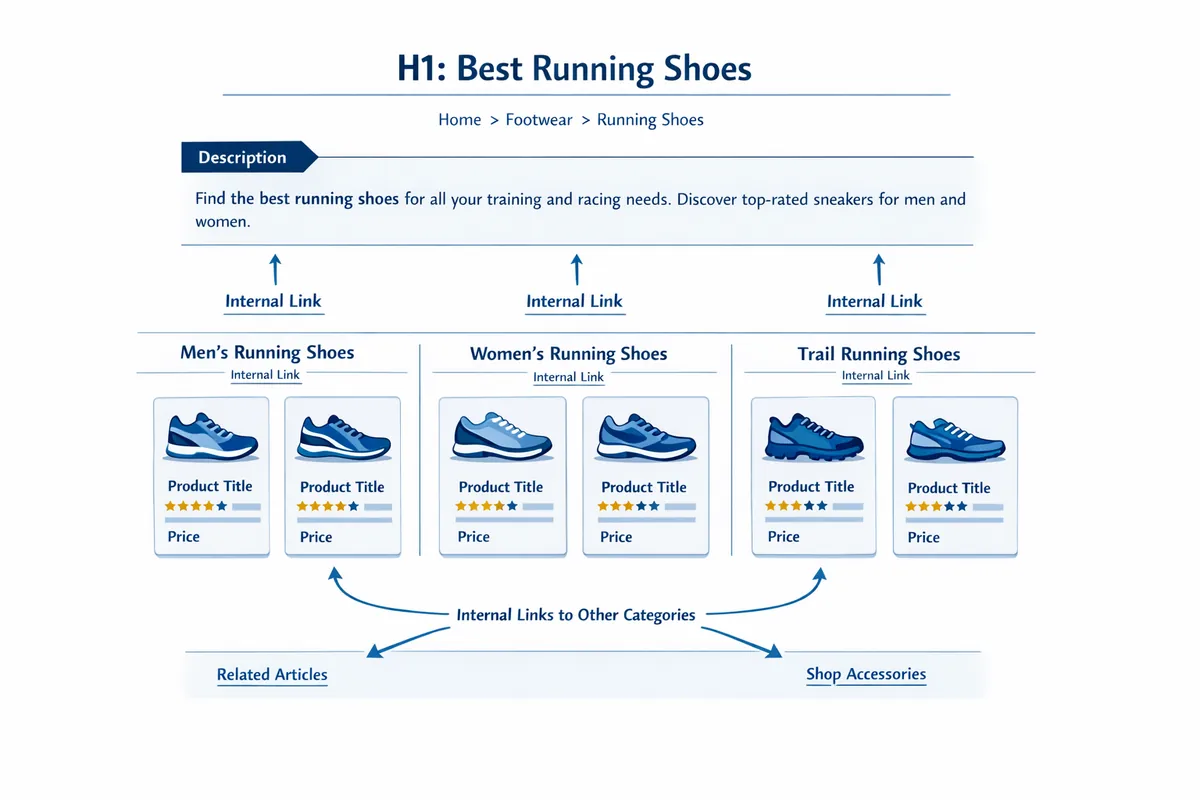
Most Shopify stores leave collection pages as bare product grids with no descriptive content. Fix this:
- Write 200-400 words of collection description. Place it above the product grid. Include your target keyword, related terms, and at least one internal link to a relevant blog post or subcollection.
- Optimise the collection title tag. Don't use the default collection name. Target the exact phrase your customers search: "Buy Running Shoes Online South Africa" not just "Running Shoes."
- Add an FAQ section below the product grid. Answer 3-5 buying questions specific to that category. This adds keyword-rich content and qualifies for FAQ rich snippets.
- Link between related collections. A "Winter Jackets" collection should link to "Scarves & Beanies" and vice versa. This builds topical clusters that Google rewards.
Content Marketing for Shopify SEO
Shopify's built-in blog is basic but functional for SEO. Publishing informational content around your product categories builds topical authority, captures long-tail search traffic, and creates internal linking opportunities that strengthen your entire store's rankings.
What to Write About
Map blog content to the buyer journey. For an SA fashion store, that might look like:
- Awareness stage: "How to Style Linen in Durban's Humidity" (informational, targets long-tail keywords)
- Consideration stage: "Cotton vs Polyester for South African Summers" (comparison, builds authority)
- Decision stage: "Best Lightweight Jackets Under R1,500" (commercial, links directly to products)
Every blog post should link to at least two relevant collection pages and two specific products. This passes link equity from your informational content to your money pages. Understanding how entity SEO works will help you structure this content to match Google's knowledge graph expectations.
Blog Technical Setup
Shopify's blog has SEO-relevant settings most store owners ignore:
- Set a custom URL handle for every post (Settings → SEO). Remove dates and filler words.
- Write a unique meta description for each post. Shopify auto-generates one from the first paragraph, which rarely reads well in search results.
- Add a featured image with descriptive alt text. Shopify uses this as the og:image for social sharing.
- Use heading tags properly: one H1 (the post title), H2s for main sections, H3s for subsections. Never skip levels.
Local SEO for South African Shopify Stores
If your Shopify store has a physical location, showroom, or offers local collection, local SEO doubles your visibility. Google shows local pack results for ecommerce searches with location intent—and most SA Shopify stores completely ignore this channel.
Google Business Profile for Ecommerce
Claim and optimise your Google Business Profile even if you're primarily online. Set your business category to match your primary product type. Add your store URL, physical address (if applicable), and phone number. Post weekly updates featuring new products or promotions.
SA-specific tip: list Rand prices in your GBP posts. Google parses pricing information and may show it in local results. Set your service area to the regions you deliver to—national delivery stores should list South Africa as the service area.
Location Pages on Shopify
If you serve multiple regions, create location-specific pages. A Shopify store selling outdoor gear could create pages targeting "Camping Equipment Johannesburg," "Hiking Gear Cape Town," and "Outdoor Supplies Durban." Each page should include:
- Unique content about delivery times, local pickup options, and area-specific product recommendations
- Embedded Google Map (if you have a physical location)
- LocalBusiness schema with full NAP (Name, Address, Phone) data
- Links to your most popular collections for that region
For a complete breakdown of local SEO strategies, read our guide on Google Business Profile optimisation.

Shopify SEO Apps and Tools Worth Using
The Shopify App Store lists 400+ SEO apps. Most are redundant or do things Shopify already handles. After testing dozens across client stores, these are the ones that deliver measurable results for South African ecommerce.
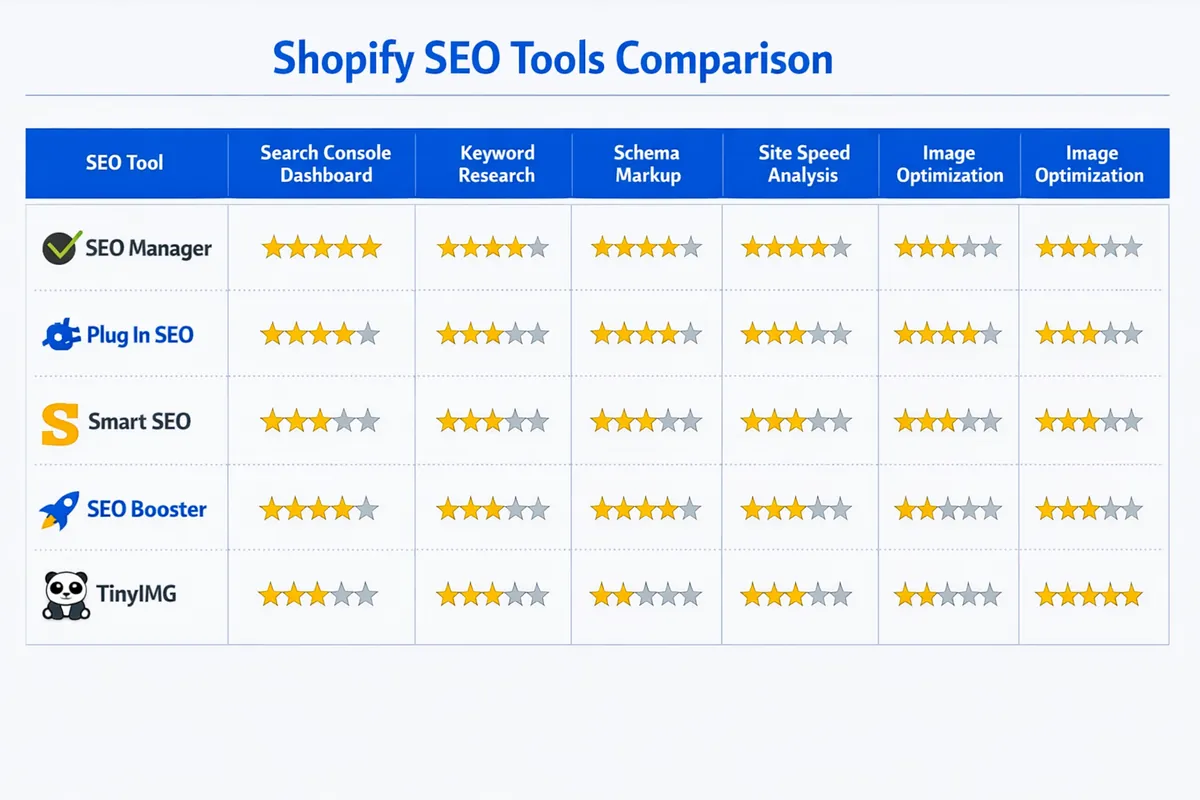
Warning: Every app you install adds JavaScript to your store. Only keep apps you actively use. An unused app still loads its scripts on every page view, slowing your site for every visitor.
Recommended Apps
- JSON-LD for SEO (from R200/month) — Adds complete structured data: Product, BreadcrumbList, Organization, Article, FAQPage. The single most impactful SEO app for rich snippet visibility.
- Yoast SEO for Shopify (free tier available) — On-page content analysis, readability scoring, and meta tag management. Familiar interface if you've used WordPress.
- TinyIMG (free tier available) — Automated image compression and lazy loading. Reduces image file sizes by 50-70% without visible quality loss.
- Search Console integration (free) — Connect Google Search Console directly to Shopify to monitor indexing status, crawl errors, and keyword performance. No app needed—just verify your domain in GSC.
Free Tools That Complement Shopify
- Google Search Console — Non-negotiable. Monitor which keywords drive clicks, find indexing issues, and submit new pages for crawling.
- Google PageSpeed Insights — Test your store's Core Web Vitals. Focus on mobile scores—that's how most SA shoppers browse.
- Screaming Frog (free up to 500 URLs) — Crawl your store to find broken links, missing meta tags, duplicate titles, and orphaned pages.
Measuring Your Shopify SEO Results
Track four metrics monthly to gauge whether your Shopify SEO work is producing results:
- Organic sessions (Google Analytics → Acquisition → Traffic acquisition → Organic Search). This is your headline number. Anything above 10% month-over-month growth means your SEO is working.
- Keyword positions (Google Search Console → Performance → Queries). Track your top 20 target keywords. Look for upward movement over 90-day periods, not daily fluctuations.
- Organic revenue (Shopify Analytics → Sales by traffic source). This is the metric that matters most. Increased traffic with flat revenue means you're ranking for the wrong keywords or your conversion funnel is broken.
- Indexed pages (Google Search Console → Pages). If your indexed page count is significantly lower than your total product count, you have crawling or indexing issues that need immediate attention.
Building strong E-E-A-T signals across your store—customer reviews, expert content, transparent business information—amplifies every other SEO effort you make.
SA-Specific Shopify SEO Considerations
South African ecommerce has unique factors that affect how you approach Shopify SEO:
- Payment gateway signals. Integrating Payfast, Peach Payments, or Ozow builds local trust signals. Google's Search Essentials documentation emphasises trust as a ranking factor—SA-specific payment methods signal local legitimacy.
- Rand pricing in structured data. Set your Shopify store currency to ZAR so Product schema includes
"priceCurrency": "ZAR". This helps Google match your products to South African search queries with price intent. - Delivery information as content. SA shoppers search for delivery-related terms: "next day delivery Johannesburg," "free shipping South Africa." Create a dedicated shipping information page and link to it from product pages. This content ranks for long-tail queries and reduces cart abandonment.
- POPIA compliance. Your privacy policy page needs to comply with the Protection of Personal Information Act. Beyond legal requirements, a comprehensive privacy page is a trust signal that Google factors into site quality assessments.
- Load-shedding resilience. If you sell electronics, generators, or solar products, create content around load-shedding-related searches. This is a uniquely South African search category with strong commercial intent and relatively low competition.
Your Shopify SEO Action Plan
Prioritise these fixes based on impact. In our experience, stores that follow this order see the fastest ranking improvements:
- Week 1: Fix all title tags and meta descriptions across your top 20 products and top 5 collections. Connect Google Search Console.
- Week 2: Write original product descriptions for your top 20 products. Add alt text to all product images.
- Week 3: Add 200-400 word descriptions to your top 5 collection pages. Install schema markup app.
- Week 4: Audit and remove unused apps. Compress all images. Test page speed on mobile.
- Month 2 onwards: Publish 2-4 blog posts per month targeting long-tail keywords in your niche. Build internal links from blog content to collection and product pages.
Shopify SEO isn't a one-time project—it's ongoing maintenance. Google re-crawls and re-evaluates your store constantly. But the stores that commit to this process consistently outrank competitors spending three times as much on paid ads. For a deeper look at ecommerce-specific SEO strategies, visit our ecommerce SEO services page.
Get Expert Shopify SEO Help
We specialise in ecommerce SEO for South African businesses. From technical audits to content strategy, we'll build the organic traffic your Shopify store deserves.

Frequently Asked Questions
Shopify handles basic technical SEO automatically—XML sitemaps, canonical tags, robots.txt, and mobile-responsive themes. But you still need to manually optimise title tags, meta descriptions, image alt text, product descriptions, URL handles, and schema markup. The platform gives you a foundation; ranking requires hands-on work.
Professional Shopify SEO services in South Africa range from R3,000 to R15,000 per month, depending on store size, product count, and competitive landscape. DIY optimisation using free Shopify apps and Google Search Console costs nothing beyond your time. Most stores see measurable organic traffic improvements within 3-6 months of consistent work.
The biggest issues are duplicate content from product variants and collections, limited URL structure (forced /products/ and /collections/ prefixes), thin product descriptions copied from manufacturers, slow page speed from app bloat, missing schema markup beyond basic Product schema, and poor internal linking between collections and blog content.
Expect 3-6 months for measurable results. Quick wins like fixing title tags and meta descriptions can improve click-through rates within weeks. Deeper work—content creation, backlink building, and technical fixes—compounds over 6-12 months. Stores in less competitive niches see faster results than those in saturated markets like fashion or electronics.
Use an app if your budget is under R5,000 per month and you have time to learn. Apps like Yoast SEO for Shopify or Smart SEO handle basics like meta tags and schema. Hire an agency for keyword strategy, content creation, link building, and technical audits. Most growing SA stores benefit from both: an app for daily tasks and quarterly agency audits for strategy.